Thesis Tittle Report (Power Point)

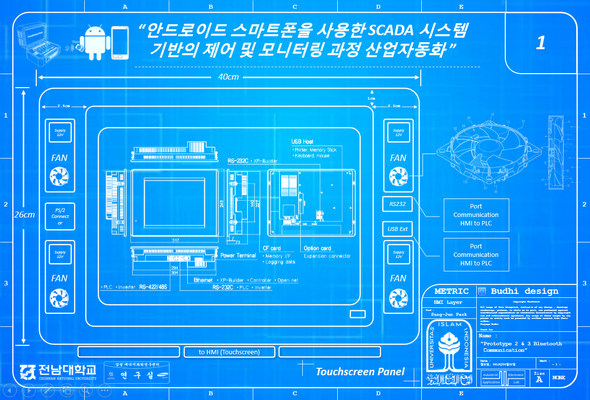
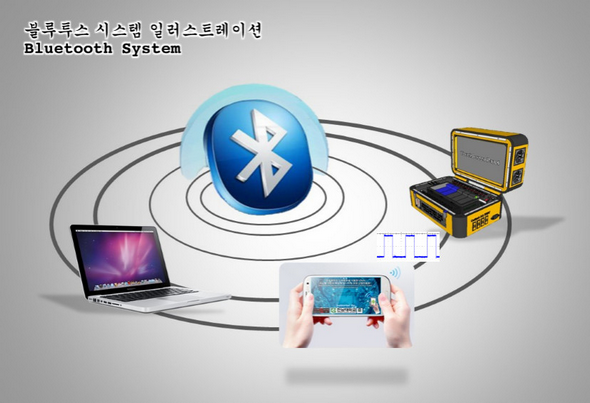
This PPT Final Report file describes how to SCADA (Supervisory Control and Acquisition Data) implemented to android mobile device using bluetooth communication. For more detail you can download this ppt file here

Final Thesis Report

Belum di edit

Illustration Mobile SCADA Project

Belum di edit

Hierarchy Prototype of System

Belum di edit

Test I/O ADC DAC Port of PLC

Belum di edit

Test and Run Signal using Oscilloscope

Belum di edit

Mobile SCADA Android User Interface Design

Belum di edit

Blueprint Prototype 1

Belum di edit

Blueprint Prototype 2

Belum di edit

Blueprint Prototype 3

Belum di edit

Blueprint Prototype 4

Belum di edit

Blueprint Prototype 5

Belum di edit

Our Labs Profile

Belum di edit

Design by Solidworks

Belum di edit

Design by Solidworks

Belum di edit

Design by Solidworks

Belum di edit

Comsol Multiphysics Training Gangnam-gu South Korea

Belum di edit

Monday, January 19, 2015

Bluetooth UUID Link

As we know UIID is Universally Unique Identifier standard use in software construction. Consist of 128bit value. (wikipedia).
Sample of UUID script implement to android mobilephone (here)

Format Coding on Eclipse Java Programming (here).


Here is a Unique Code ID:
ServiceDiscoveryServerServiceClassID_UUID: TGUID = ‘{00001000-0000-1000-8000-00805F9B34FB}';
BrowseGroupDescriptorServiceClassID_UUID: TGUID = ‘{00001001-0000-1000-8000-00805F9B34FB}';
PublicBrowseGroupServiceClass_UUID: TGUID = ‘{00001002-0000-1000-8000-00805F9B34FB}';
SerialPortServiceClass_UUID: TGUID = ‘{00001101-0000-1000-8000-00805F9B34FB}';
LANAccessUsingPPPServiceClass_UUID: TGUID = ‘{00001102-0000-1000-8000-00805F9B34FB}';
DialupNetworkingServiceClass_UUID: TGUID = ‘{00001103-0000-1000-8000-00805F9B34FB}';
IrMCSyncServiceClass_UUID: TGUID = ‘{00001104-0000-1000-8000-00805F9B34FB}';
OBEXObjectPushServiceClass_UUID: TGUID = ‘{00001105-0000-1000-8000-00805F9B34FB}';
OBEXFileTransferServiceClass_UUID: TGUID = ‘{00001106-0000-1000-8000-00805F9B34FB}';
IrMCSyncCommandServiceClass_UUID: TGUID = ‘{00001107-0000-1000-8000-00805F9B34FB}';
HeadsetServiceClass_UUID: TGUID = ‘{00001108-0000-1000-8000-00805F9B34FB}';
CordlessTelephonyServiceClass_UUID: TGUID = ‘{00001109-0000-1000-8000-00805F9B34FB}';
AudioSourceServiceClass_UUID: TGUID = ‘{0000110A-0000-1000-8000-00805F9B34FB}';
AudioSinkServiceClass_UUID: TGUID = ‘{0000110B-0000-1000-8000-00805F9B34FB}';
AVRemoteControlTargetServiceClass_UUID: TGUID = ‘{0000110C-0000-1000-8000-00805F9B34FB}';
AdvancedAudioDistributionServiceClass_UUID: TGUID = ‘{0000110D-0000-1000-8000-00805F9B34FB}';
AVRemoteControlServiceClass_UUID: TGUID = ‘{0000110E-0000-1000-8000-00805F9B34FB}';
VideoConferencingServiceClass_UUID: TGUID = ‘{0000110F-0000-1000-8000-00805F9B34FB}';
IntercomServiceClass_UUID: TGUID = ‘{00001110-0000-1000-8000-00805F9B34FB}';
FaxServiceClass_UUID: TGUID = ‘{00001111-0000-1000-8000-00805F9B34FB}';
HeadsetAudioGatewayServiceClass_UUID: TGUID = ‘{00001112-0000-1000-8000-00805F9B34FB}';
WAPServiceClass_UUID: TGUID = ‘{00001113-0000-1000-8000-00805F9B34FB}';
WAPClientServiceClass_UUID: TGUID = ‘{00001114-0000-1000-8000-00805F9B34FB}';
PANUServiceClass_UUID: TGUID = ‘{00001115-0000-1000-8000-00805F9B34FB}';
NAPServiceClass_UUID: TGUID = ‘{00001116-0000-1000-8000-00805F9B34FB}';
GNServiceClass_UUID: TGUID = ‘{00001117-0000-1000-8000-00805F9B34FB}';
DirectPrintingServiceClass_UUID: TGUID = ‘{00001118-0000-1000-8000-00805F9B34FB}';
ReferencePrintingServiceClass_UUID: TGUID = ‘{00001119-0000-1000-8000-00805F9B34FB}';
ImagingServiceClass_UUID: TGUID = ‘{0000111A-0000-1000-8000-00805F9B34FB}';
ImagingResponderServiceClass_UUID: TGUID = ‘{0000111B-0000-1000-8000-00805F9B34FB}';
ImagingAutomaticArchiveServiceClass_UUID: TGUID = ‘{0000111C-0000-1000-8000-00805F9B34FB}';
ImagingReferenceObjectsServiceClass_UUID: TGUID = ‘{0000111D-0000-1000-8000-00805F9B34FB}';
HandsfreeServiceClass_UUID: TGUID = ‘{0000111E-0000-1000-8000-00805F9B34FB}';
HandsfreeAudioGatewayServiceClass_UUID: TGUID = ‘{0000111F-0000-1000-8000-00805F9B34FB}';
DirectPrintingReferenceObjectsServiceClass_UUID: TGUID = ‘{00001120-0000-1000-8000-00805F9B34FB}';
ReflectedUIServiceClass_UUID: TGUID = ‘{00001121-0000-1000-8000-00805F9B34FB}';
BasicPringingServiceClass_UUID: TGUID = ‘{00001122-0000-1000-8000-00805F9B34FB}';
PrintingStatusServiceClass_UUID: TGUID = ‘{00001123-0000-1000-8000-00805F9B34FB}';
HumanInterfaceDeviceServiceClass_UUID: TGUID = ‘{00001124-0000-1000-8000-00805F9B34FB}';
HardcopyCableReplacementServiceClass_UUID: TGUID = ‘{00001125-0000-1000-8000-00805F9B34FB}';
HCRPrintServiceClass_UUID: TGUID = ‘{00001126-0000-1000-8000-00805F9B34FB}';
HCRScanServiceClass_UUID: TGUID = ‘{00001127-0000-1000-8000-00805F9B34FB}';
CommonISDNAccessServiceClass_UUID: TGUID = ‘{00001128-0000-1000-8000-00805F9B34FB}';
VideoConferencingGWServiceClass_UUID: TGUID = ‘{00001129-0000-1000-8000-00805F9B34FB}';
UDIMTServiceClass_UUID: TGUID = ‘{0000112A-0000-1000-8000-00805F9B34FB}';
UDITAServiceClass_UUID: TGUID = ‘{0000112B-0000-1000-8000-00805F9B34FB}';
AudioVideoServiceClass_UUID: TGUID = ‘{0000112C-0000-1000-8000-00805F9B34FB}';
SIMAccessServiceClass_UUID: TGUID = ‘{0000112D-0000-1000-8000-00805F9B34FB}';
PnPInformationServiceClass_UUID: TGUID = ‘{00001200-0000-1000-8000-00805F9B34FB}';
GenericNetworkingServiceClass_UUID: TGUID = ‘{00001201-0000-1000-8000-00805F9B34FB}';
GenericFileTransferServiceClass_UUID: TGUID = ‘{00001202-0000-1000-8000-00805F9B34FB}';
GenericAudioServiceClass_UUID: TGUID = ‘{00001203-0000-1000-8000-00805F9B34FB}';
GenericTelephonyServiceClass_UUID: TGUID = ‘{00001204-0000-1000-8000-00805F9B34FB}';

Friday, January 9, 2015

Software Collection Part 2 of 2

00. Arduino
01. CAD/CAM/CAE
      A. Eagle v4.3
      B. ArchiCAD v18
      C. Bentley
      D. Blender
      E. Catia
      F. Cimatron v10
      G. Comsol v4.2b (Korean Version)
      H. IronCAD 2014
      I. MasterCAM x5 (for Solidoworks)
      J. Micro Programming
      K. Pepakura Designer v3.1.2
      L. PTC Creo
      M. Render Software Collection (Keyshot, Maxwell, Photoview)
      N. Rhinocheros v5
      O. Sketchup
      P. Solid Edge
      Q. Sweet Home 3D
      R. 3D Coat v4 64bit
      S. Mastercam x8 17.016257.0 x64
02. C & C++ OOP
      A. Code BLock
      B. MVS Professional 2010
      C. MVS Ultimate 2014
      D. Source Insight
      E. Whole Tomato Visual Assist X v10.7
03. Delphi
04. Etap
05. SCADA
      A. KGL-WIN (LG Master- Series PLC)
      B. Cimon v2.70
      C. XP Builder v1.4 for HMI
06. Leap Motion SDK
07. Minitab v16.2.3 (Korean Version)
08. Matlab v2009a
09. Multisim 2011
10. PCB Maker Tools
      A. Ansys WB v10 ED
      B. Altium Designer v15
      C. Cadkey v21.5
      D. CAM v8.5
      E. PCB Translators 3.61A
      F. CamCAD Vision v3.6.1A
      G. Circuit Shop v1.09
      H. Eagle
      I. Lab Center Proteus v8.1 SP 1
      J. OrCAD v16.5
      K. PADS 9.41 (korean version)
      L. PCB Designer
      M. Protel Printed Circuit Board
      N. PSCAD v.4.21 2007 피에스캐드평가판
      O. PSpice
11. Ruby Programming
12. PSIM v9.1 (Korean Version)
13. Visual basic
14. HSPICE 2010
15. Barcode Generator v2
16. Myo Developt
17. Robot 6 Arm Software (Fanuc, ABB, Yaskawa)
      A. ABB (Europe)
      B. Durr (Germany) : Easy Rob Simulator
      C. Fanuc (Japan) : Robo Guide
      D. Motoman
      E. Soft Sim
      F. Unknow
18. PHP
19. Miscellaneous
      A. DSCH2 (Digital simulation gate)
      B. Electrical and Electronics Formulas v3.0
      C. Electrical Calculation 2.31
      D. Electronics DEsign Studio 1.2A
      E. Eletronics Workbench Multisim v5.12
      F. IntelliCAD 2001 Standard Edition

Thursday, January 8, 2015

Software Collection Part 1 of 2

List Software
i had been strugling since mindle schools for seeking and collect any illegal software until right know..
so this is the list i have.
01. 3D Connection CAD/CAM Mouse
02. Accessories
      A. Alien Skin
      B. Dream Scene
      C. Glass (Transparent Windows)
      D. Nox SkinPack
      E. Rocket & Object Dock
      F. Screen Saver maker
      G. Nexus ultimate
      H. Wallpaper Maker
      I. Windows Sidebar
03. Adobe Family
      A. Acrobat Reader
      B. After Effect
      C. Air
      D. Foxit Reader
      E. Illustrator CS4 & CS6
      F. Multiple Language pack
      G. PDF Plugin
      H. Shockwave Player
      I. Dream
      J. Flash
      K. Font Pack
      L. Nitro PDF
      M. Photoshop (CS2,3,4,5,6)
      N. Lighting Room 5.3
04. Antivirus
      A. AVG
      B. Esset Node
      C. Panda
      D. Avira
      E. SMADAV
05. Language
06. Blog and Site Tools
      A. Filezilla
      B. Joomla
      C. xammp
07. Book Design Maker
08. Bootcamp for Mac
09. Bright Screen Change
10. Cheat Engine
11. Image and Video Converter
      A. Ezvid
      B. Blueberry Soft
      C. CamStudio
      D. Rylstim
12. Corel Draw (X2, X3, X4, X5, X6, X7)
13. Steal
      A. HTML Internet Explorer (Korean)
      B. Internet Basic Explorer (Korean)
      C. Namo FX
14. Image Drive
      A. Acronis
      B. Daemon
      C. iClone
      D. Nero
      E. Power ISO
15. Digital Magazine Design Tools
16. Dot Net Update
17. Edraw Max 2014 v7.2.0
18. Extract Tools
19. Fastone Capture
20. File Hippo Site
21. Font Maker
22. Game
      A. Age of Empire 3
      B. Assassins Creen Brotherhood
      C. Battlefield 4 reloaded
      D. Crysis (1, 2, 3)
      E. Dota
      F. FIFA 2014
      G. Final Fantasy 3 Reloaded
      H. Game House Collection
      I. Moto GP (2013, 2014)
      J. Ironman
      K. Metal Gear Rising
      L. Mortal Combat 2014
      M. Naruto Shippuden 3
      N. Need For Speed Rivals
      O. NFS Most wanted 2013
      P. Pro Evolution Soccer 2010
      R. Red Alert 2, 3
      S. Section Prejudice v8
      T. Sniper Elite
      U. Sonic
      V. Stronghold Crussader
      W. Star Craft II
23. HDD Repair and Backup Tools
      A. Seagate
      B. Hardrive Inspector v4.12.155 Pro
      C. HD Tune Pro v5.5
      D. HDAT 2
      E. HDD Recovery Pro 4.1
      F. HDD Regenerator 2011     
      G. HDD life Pro v4.0.192
      H. MiniTool Partition Wizard
24. Hiren Boot CD 15.2
25. Icon Collection
26. Internet
      A. Internet Download Manager
      B. uTorrent
      C. Chrome
      D. DNS Jumper
      E. Spy Tools
      F. FireFox
      G. Hotspot
      H. Safari
      I. Maxton
      J. Netcut
      K. File Sharing Online
      L.Skype
      M. SoftPerfect Bandwidth Manage
      N. Google Earth Pro v7.1.1.1888
27. Ironman J.A.R.V.I.S OS
28. Islam
29. KJB Korean Bank
30. LTE LG LU6200 Korean Version
31. Logitecth EX100
32. Logo Maker
33. Mac Tools 2015 Collection
34. Maintenance Collection
      A. AMLFree Registry Cleaner v4.22
      B. ATF Cleaner
      C. CCleaner
      D. Dll-files Fixer v3.081
      E. Driver Genius
      F. Duplicate Cleaner
      G. Everest
      H. PC Performer
      I. Recovery
      J. Registry Booster
      K. TuneUp Utilities 2010, 2012, 2013, 2014
      L. Anti Executable
      M. Uninstaller
      N. Virtual Box
      O. Recovery
      P. Partition Magix
      Q. PC Cleaner Pro 2014
      R. Deep Freeze
      S. RegClean Pro v6
      T. Total Commander
35. Management Folder
36. Maps
      A. Google Maps 3D View
      B. iMaps (Flash) Jogja & Jakarta
37. Multimedia
      A. K-Lite Media CodePack
      B. Jet Audio v8 Premium
      C. LG Cyberlink
      D. Magic Digital Video, Foto, Music Maker 2014
      E. Movie Maker 2014 (Korea)
      F. GOM Player
      H. QT-Lite
      I. VLC Player
      J. Pinnacle Studio v15 HD Ultimate
      K. Minilyrics v7.6.44
      L. Magic SWF2Avi 2008 v6.7.0.128
      M. Xilisoft Video Converter Ultimate v7.8.6
38. Office
      A. Hancom (hangeul) Korean
      B. Microsoft office
      C. Microsoft Toolkit v2.4.9
      D. Microsoft Visio
      E. Office Tab Enterprice
      F. Prezi
      G. Power Point Multiwindows
39. Online Storage
      A. Dropbox
      B.  4Shared Dekstop
      C. iCloud
40. Operating System (OS)
      A. XP, Vista, W7, Ubuntu, Macintosh (Available Korean Version)
      B. Ultimate Boot CD v5.3.0
      C. Win to USB
41. PC Accessories Miscellaneous
      A. Pen Drive
      B. Motherboard
42. Picasa
43. Portable
      A. Cameyo
      B. Enigma
      C. Evalaze
      D. Spoon Studio
      E. VMware ThinApps
44. Print and Video Edit and Recording
      A.Camtasia
      B. Fastone Capture
45. Samsung Kies
46. Seagate HDD Soft
      A. Seagate Dashboard v3 (Windows & Mac)
      B. SeaTools (Windows)
47. Server CNU Korean Version
      A. Part 1 (Adobe Collection Premium, Photoshop CS4)
      B. Part 2 (Ahnlab, hangeul)
48. Show Picture
      A. ACDSee v12.0.344
      B. Irfan View v4.27
      C. Picasa v3.8
49. Sipil 2015
      A. AutocaadEtabSAP
      B. Part 2, 3, 4, 5
50. Team Viewer
51. Transfer (Tera Copy Pro v2.3)
52. Trial Soft Kill
      A. Deep Freeze
      B. Revo Uninstall Pro
      C. Run as Data
      D. Time Stoper
53. USB, Flashdisk
      A. Ratool
      B. USB Safely Remove
54. Virtual Machines
      A. Virtual Box
      B. For Mac
55. Windows Update
56. Wifi and hacking tools

Sunday, January 4, 2015

Keyshot 5 VR Tutorial

https://www.keyshot.com

How Easy is Keyshot?
KeyShot is the fastest and easiest to use 3D rendering and animation software available. In just a few steps you can create amazing looking images from your 3D models that can be used throughout the product development process to make design decisions and quickly create variations of concepts for customer, manufacturing or marketing.

What's New is KeyShot 5
KeyShot 5 brings new features to the fastest 3D rendering and animation system available. With news ways to discover and share resources through the KeyShot Cloud, create product variations through Instancing, captivate with new animation tools or apply accurate Sun & Sky lighting to imported NURBS geometry, KeyShot is your key to creating amazing shots
System Requirements
KeyShot doesn’t require any special hardware or graphics card. KeyShot takes full advantage of all cores and threads inside a computer. As your computer gets more powerful KeyShot becomes faster. The performance scales linearly with the number of cores and threads in your system. To get started, this is all you will need:
  • Minimum 2GB of RAM
  • Minimum 2GB hard disk space
  • 3 button mouse
  • Monitor resolution of 1024 X 768 or greater
  • Any graphics card
  • INTEL Pentium 4 processor or AMD or better
  • Windows 7 32/64 bitor Windows 8 32/64 bit or later
  • OpenGL 2.x or higher 

https://www.keyshot.com/vr/

What is KeyShot VR
KeyShotVR is a patent-pending technology that brings the advantage of interactive 3D-enabled viewing via desktop, laptop or mobile device to produce portfolios, presentations and collateral for design reviews. Product designers, marketers and KeyShot users who want to extend the presentation of their visuals are able to create the high-quality, ray-traced 3D content directly from inside KeyShot. KeyShotVR is an integrated add-on to KeyShot Pro that automatically generates the code to be embedded into any website or company intranet, making it a turnkey solution for web content creation.

How it Works
With KeyShotVR enabled via an upgraded KeyShot license file, an addtional VR button will appear in the toolbar. When a scene is loaded and the VR button is pressed, a wizard guides the user through the setup of the VR, with on-screen, interactive feedback of the final VR result. KeyShot will produce the individual images of the VR content, the HTML code for integration into any website and the JavaScript to support progressive loading of images. 

Features
  • 5 VR types: Turntable, Hemi-spherical, Spherical, Tumble, Custom
  • Output: jpg, png
  • Zoom/Fullscreen options
  • Set horizontal/vertical frames
  • Set start and end angle interactively
  • Unlimited output resolution
  • Adjustable rotation damping
  • iBook widget creation
  • Render queue support
  • Network Rendering support
  • Background render support
  • Realtime feedback: play, tweak, etc. for desired result as you setup VR
  • Compression quality control: small size with highest quality images
  • Floating license: KeyShotVR can be checked out separately when checking out a floating license.
KeyShotVR (Web browser features):
  • Zoom in/out
  • Fullscreen mode
  • Responsive sizing
  • Automatic upload to FTP server
  • Touch enabled: rotate, zoom, pan
  • Customizable play and resize buttons
  • Progressive loading: rotate images as soon as they start loading
  • Customizable settings to adjust user experience: rotation damping, mouse sensitivity, zoom in/out, start frame, LOD
Tutorial Luxion KeyShot VR versi 5
Sebenarnya banyak sekali tutorial rendering keyshot 5 VR, saya disini hanya memberikan sedikit tutorial setting konfigurasinya.
Preview:


Friday, January 2, 2015

Link of PLC

Sunday, December 28, 2014

Solidworks 2015 Release

Offer the latest Solidworks 2015 Service Pack 1.0 All users with the update service can download the latest update to solidworks 2014 from (here). Then in section Software and Update are vailable for download.
Note : Solidworks 2012 is the lastest version of cooperating with windows XP. Solidworks 2015 installing Windows XP will not be possible! Solidworks 2015 it is possible to install only on 64-bit platform.

   Dassault Systems, The 3D Experience Company, world leader in Product Lifecycle Management (PLM) solutions, 3D design software and 3D Digital Mock Up, announced Solidworks 2015, the latest release of the company's successful portfolio of 3D design software applications. With Solidworks 2015, user gain access to cloud based capabilities and a wider range of choise for improving productivity, work processes, and operationg costs.
   Solidworks 2015 covers all comprehensive aspects of the product development process with an intuitive, integrated 3D development environment that includes 3D design, simulation, electrical design, product data management and technical communication. In addition, starting with the new collaborativesharing feature, Solidworks 2014 enables access to Dassault Systems 3D experience platform and its cloud based capabilities. Designers and engineers can span multiple disciplines with ease, shortening the design cycle, increseing productivity and collaborating to deliver innovative products to market faster.
   Solidworks 2015 not only delivers key enhancements requested by the entire user base, but also solutions for a wide array of industries and markets. For example, Solidworks user will be able to easily enhance the aesthetics of consumer products and apparel also simulate contruction machinery, building infrastructure and machine tools better than ever before.
   Solidworks 2015 Portfolio Enhancements
Following are the top user requested feature, products and enhancements included in the solidworks 2015 portfolio:
1. Improve Everyday Productivity
    A. Focus On Design, Not Modelling with new feature that reduce geometry creation steps.
    B. Faster Information Sharing which mean Improveed General performance, faster analysis and 
         streamlined approaches gives user the data to quckly make decisions and keep designing.
    C. Enhanced User Experience which mean An Improved Graphical Interface presents a clear 
         view of critical data to help focus on design.
    D. Simulate Multiple Design Scenarios which mean Quickly Evaluate the effect of various load 
        combinations on a model and tracking results.
    E. My Solidworks Standard and Professional subscription levels deliver more than 100 hours 
        of Solidworks trainng materials and online file exchange service.

2. Optimize Work process
    A. Collaborative Sharing : By easily accessing social collaboration and online data management
        tools on 3D Experience platform, user can benefit from faster development and quicker decision
        making.
    B. Solidworks Treehouse : Top down design is facilitated by visual creating assemblies, enabling
        product structure to be managed at the begining of design projects.
    C. Web 2 for solidworks Enterprice PDM : with the addition of mobile connectivity, user can
        connect to Enterprice PDM from any location, at any time.

And this is model mania since 2000 untuk 2014

How to Install Solidworks.
Preview:

Well Done,.
thank you for visiting...
to be continued..

Friday, December 26, 2014

Tutorial Install XAMPP Di Windows 7 64bit

XAMPP adalah sebuah program yang dikembangkan oleh Apache Friends yang bertujuan untuk memberikan kemudahan dalam membangun suatu sistem web server dengan beberapa program yerintegrasi sekaligus seperti Apache, MySQL, PHP, Perl dan bahkan FTP Server. Dengan adanya XAMPP, seseorang yang ingin membuat lingkungan pengembangan aplikasi berbasis web menjadi sangat terbantu dan dimudahkan. Saya menginstall XAMPP di komputer Windows 7 Ultimate x64 yang saya gunakan sehari-hari, agar bisa belajar pemograman PHP secara lebih gampang.
Artikel ini menjelaskan langkah demi langkah bagaimana cara install aplikasi XAMPP.

Cara Installasi XAMPP di Window 7
Menginstall aplikasi XAMPP tentu saja tidaklah sulit, hanya saja terkadang kita bingung harus memulai dari mana, cara menginstallnya sama dengan program windows yang lain pada umumnya. Hanya perlu mendownload installer XAMPP nya lalu klik ganda, next, next dan selesai. Agar lebih mudah dipahami.
 
Tampilan gambar diatas merupakan jendela paling awal ketika menginstall XAMPP, tunggu beberapa saat.
Jendela Warming akan muncul untuk menonaktifkan UAC.
Klik tombol Next> untuk melanjutkan
Pada halaman penginstallan berikutnya, kita bisa memilih komponen atau program apa saya yang akan diinstall ke komputer. Sata tidak memerlukan tomcat, mail server dan tidak pula FTP server. Sesuaikan dengan kebutuhan masing-masing. Saya hanya memerlukan beberapa program seperti yang terlihat pada gambar diatas, lalu klik Next> untuk melanjutkan.
Kemudian, tentukan folder untuk menyimpan file XAMPP, secara default XAMPP akan diinstall di drive C:\xampp. saya memilih untuk membuarkan XAMPP menggunakan folder defaultnya tersebut. Next>
Halaman berikutnya adalah kesempatan yang diberikan oleh XAMPP installer dan menanyakan apakah kita ingin mengetahui lebih lanjut mengenai program Bitnami atau tidak, Bitnami sendiri berfungsi memudahkan pengguna XAMPP apabila ingin menginstall aplikasi web semacam Drupal, Joomla, Wordpress dan beberapa CMS (Content Management System) populer lainya.

Halaman Ready to Install merupakan konfirmasi terkahir apakah kita benar-benar ingin menginstall XAMPP. Klik Next>
Tunggu hingga proses installasi XAMPP selesai
Klik finish untuk mengakhiri proses penginstallan program XAMPP dan jika pilihan Do You want to start the Control Panel now? kondisi di checklist, maka akan terbuka program untuk mengetahui XAMPP yang telah terinstall.
Pada kontrol panel XAMPP di atas terlihat bahwa program Apache dan MySQL belum berjalan. Klik tombol Start agar Apache dan MySQL melakukan tugasnya. Jika sudah, maka tampila \n kontrol panel XAMPP akan berubah seketika.
Selanjutnya bisa kita test apakah benar Apache telah sukses di install pada komputer anda. Buka browser lalu masukan alamat http://localhost pada address bar browser. Hasilnya seperti ini jika Apache telah diinstall dengan sukses.
Pilih satu bahasa yang diinginkan, misalnya English. Hasilnya kurang lebih seperti gambar diberikut ini:
Coba klik link Status untuk melihat fitur (komponen) XAMPP apa saja yang berjalan.
Proses installasi XAMPP telah selesai dengan sukses. Selamat Belajar PHP

Share

Facebook Twitter Delicious Digg Stumbleupon Favorites More